
A customer asks your chatbot why their variable home loan rate went up after the RBA's last move. The chatbot returns two paragraphs of text explaining how the cash rate affects variable lending rates. The customer reads it once, then again. They understand the mechanism in theory. They still aren't sure what it means for their repayments next month, so they call your contact centre.
This is the problem Claude's inline visuals are designed to solve. For Australian businesses in financial services, insurance, and telco, the gap between a text-only AI response and a genuinely understood answer is a real operational problem. This feature narrows it.
What inline visuals are, and what they are not
Anthropic shipped this capability in late March. Claude can now generate live interactive charts, diagrams, and visualisations directly inside a chat conversation. Not as a separate artifact the user downloads or saves. As part of the response itself, visible in the chat window. As of late April, it is available to all paid Claude Teams users.
These are not static images. Ask Claude to show how compound interest accumulates over 20 years at two different rates and you get a chart you can interact with. The visual updates if you change the question. It disappears when it is no longer relevant to the thread.
This is different from Claude's artifact system, which produces polished, exportable outputs. Inline visuals exist to aid understanding in the moment, not to be saved. That distinction matters for how you would design a use case around them.
The customer explainer gap in Australian financial services
APRA-regulated institutions (banks, insurers, superannuation funds) have faced a structural communication problem for decades: their products are genuinely complex, their compliance obligations constrain how they explain them, and their customers still need to understand what they agreed to. Text-based chatbots improved on static FAQs. But they have not closed the comprehension gap for questions about rate movements and repayment impacts, or how insurance excess provisions apply when fault is shared. Those questions have correct text answers. Customers still walk away confused after reading them.
Most of the AI pitch for customer service has been about cost reduction. Inline visuals are actually about reducing confusion. Those are not the same problem, and the distinction matters when you are deciding where to deploy them.
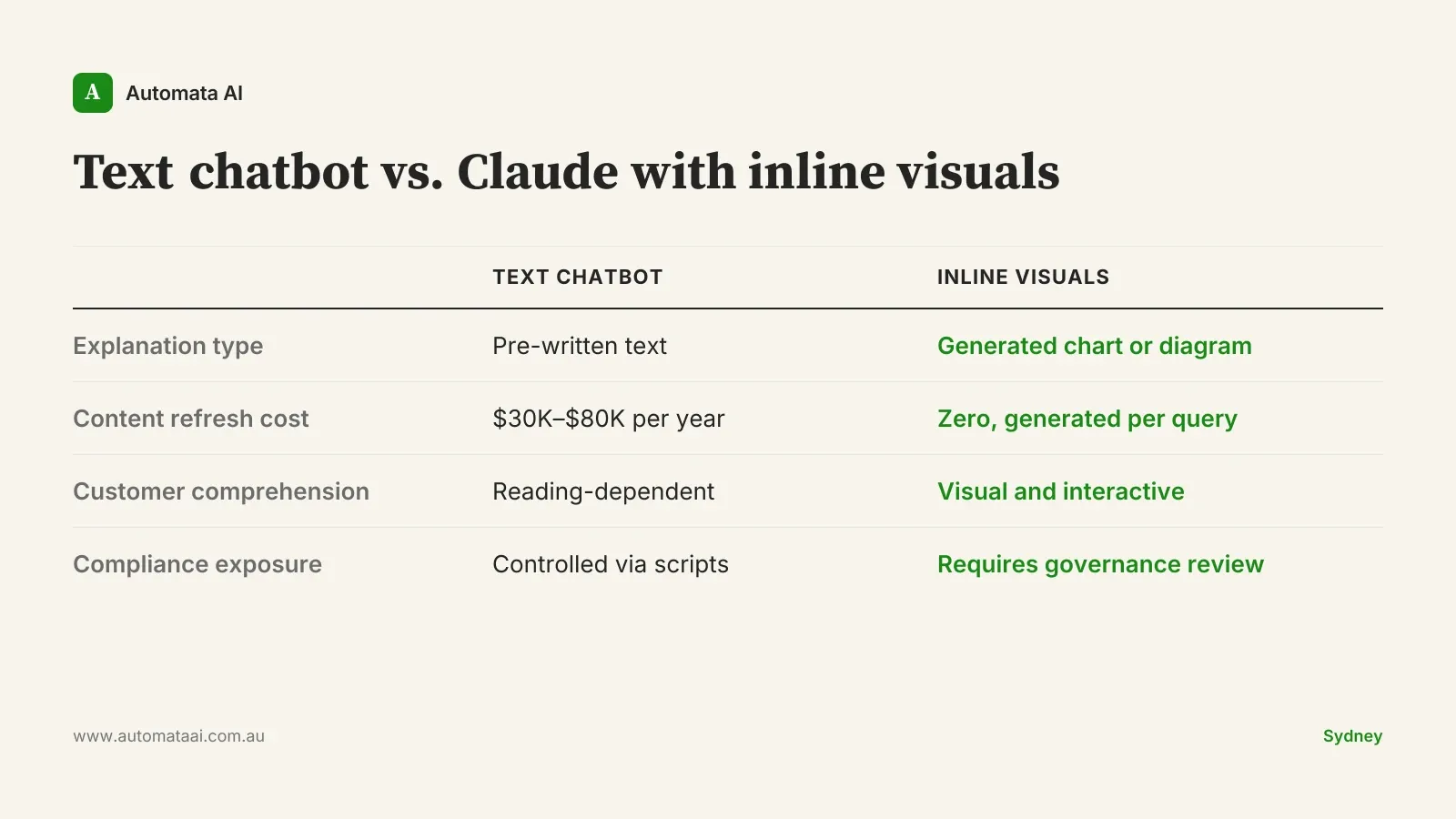
Mid-market Australian financial services firms typically spend $30,000 to $80,000 per year commissioning and refreshing explainer content: product guides, FAQ expansions, scenario calculators. The spend is structural because the long tail of customer questions always outruns the static content library, and every product change triggers a refresh cycle. Inline visuals will not replace a well-built FAQ. But for questions that sit between the standard explainer and a call to the contact centre, they offer something static content has never managed: an explanation built for the exact question being asked, at the moment it is being asked.
The shift from text to interactive visuals also changes what good looks like in a customer conversation. Text answers are evaluated by accuracy. Visual answers are evaluated by whether the customer actually understood. That is a higher bar, and it is the right bar for products like mortgages, insurance policies, and superannuation, where misunderstanding the terms has real financial consequences.
Internal training is the less obvious opportunity
The same logic applies to onboarding and compliance training. A new financial planner at an Australian advisory practice needs to understand AFSL obligations, Privacy Act requirements, and product-specific rules — not in abstract but in the context of specific client scenarios. The standard approach is a commissioned training module: typically $20,000 to $50,000 to build and another $10,000 to $15,000 per year to maintain as regulations shift and products change. Most of that cost is not in the initial build. It is in the refresh cycle.
Claude with inline visuals can generate an on-demand explanation, with an interactive diagram, based on the specific question being asked at the moment it is asked. That is not a replacement for formal compliance training that satisfies ASIC's guidance on competency. It is the layer underneath it, where the practical learning that does not fit in a module actually happens: the late-night question, the client scenario that did not appear in training, the edge case that surfaces six months in.
When this is the wrong move
Not every customer-facing explainer should run through Claude. A few constraints to be clear on before you build.
If your firm provides financial advice under an AFSL, any explanation that shades into personalised product advice creates regulatory exposure under the Corporations Act. A chart showing how a specific investment product might perform in a customer's particular circumstances could be genuinely helpful and still constitute advice. That is a legal question your compliance team needs to answer before anything goes live to customers.
Expert audiences don't need visuals. If the user already understands the underlying concepts, interactive charts add friction rather than clarity. B2B platforms serving professional investors are the clearest example.
Visuals give false confidence to uncertain projections. If the underlying assumption is shaky, making it interactive and visual makes it look more reliable than it is. Do not visualise a forecast you would not defend in writing.
Data governance needs to come first. Under the Privacy Act (1988), how customer data is handled in third-party AI services still requires a considered review. Rolling out Claude to customer-facing channels without that review is the wrong order of operations.
Picking the first use case
Claude Teams users have access to inline visuals now. The implementation work to trial it internally is genuinely minimal. The harder problem is identifying the right use case for a customer-facing context: complex enough to benefit from a visual, low-stakes enough that a misunderstood response does not create downstream legal or reputational risk, and frequent enough that any comprehension improvement is actually measurable.
The businesses that close the customer comprehension gap fastest will not be the ones that deploy the broadest chatbot coverage. They will be the ones that find the specific slice of their support volume where text has always fallen short, and build there first. That is a more useful frame than asking whether your chatbot covers everything — and a more honest way to measure whether it is working.