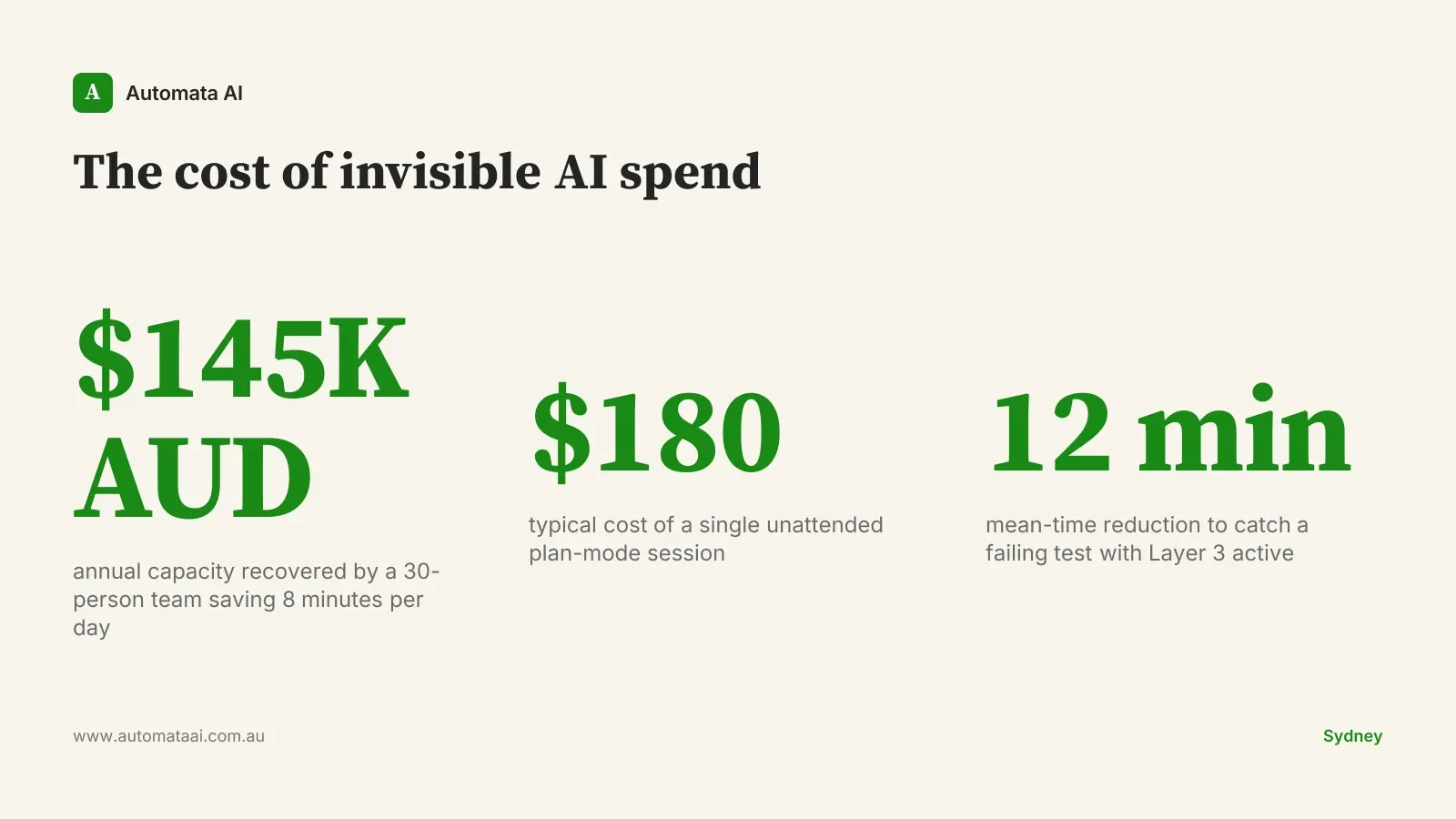
Your agent ran for forty-five minutes unattended. Plan mode, seven tool calls deep, queued changes across three files. By the time you looked, it had spent $180 in API calls and was mid-way through scaffolding a microservice you never requested.
That is not a cautionary tale from a reckless junior. It happens to experienced engineers when cost information is invisible.
The default Claude Code statusline shows model, branch, and token counts. For a solo two-hour session, that is enough. For a senior engineer running Claude Code six hours a day on a mid-market codebase in Melbourne or Sydney, the defaults leave out the information that prevents those $180 accidents. The slower, more expensive ones happen at team scale.
Why this matters at team scale
A 30-person engineering organisation, each engineer fully loaded at $200,000 per year, saving eight minutes a day of context-switching. Eight minutes that would otherwise mean a git status call, a pricing check, a scroll back through the terminal. That recovers roughly $145,000 of annual capacity. One junior hire. Three automation sprints. The platform work to configure the statusline costs a day or two.
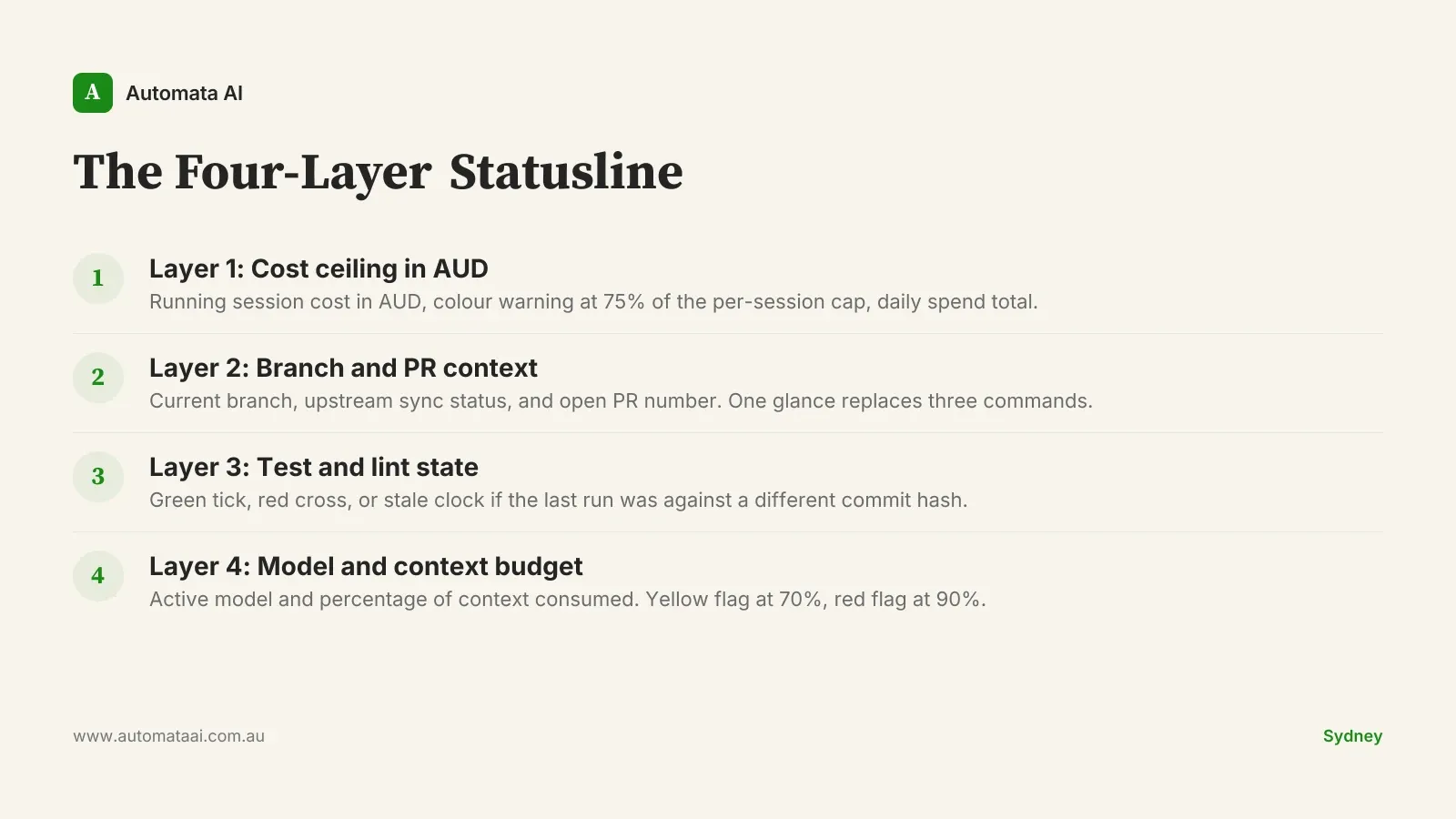
The patterns that persist across Australian mid-market engineering teams fall into four layers. We call this the Four-Layer Statusline. Engineers adopt one layer at a time, almost always starting with cost. The first layer alone justifies the configuration time.
The Four-Layer Statusline
Layer 1: Cost ceiling in AUD
The default statusline shows token spend in USD. Australian teams need three things the default does not provide: AUD conversion, a per-session ceiling, and a visual warning before the ceiling is reached.
The statusline reads the USD session spend from Claude Code, applies a configurable conversion rate, and changes colour when spend crosses 75% of the team-lead-set cap. Fields worth surfacing:
Current session cost in AUD.
Colour change at 75% of the per-session budget.
Total daily spend aggregated across all sessions.
The budget cap configured by the team lead.
This one field stops the runaway plan-mode loop. It also identifies engineers spending $400 per day on exploratory sessions. A number that becomes $8,000 a month across a team before anyone notices. Model the breakeven for your team size in the AUD savings calculator before setting session caps.
Layer 2: Branch and PR context
The statusline shows the current branch, whether it is behind or ahead of upstream, and the open PR number if one exists. Not the branch name alone — the sync status and the PR number together, in a single glance.
Three failure modes disappear immediately. A long Claude session commits to main because the engineer forgot they were on main. An agent generates a full test suite against a feature branch that diverged from origin four days ago and is silently stale. An engineer spends forty minutes debugging against the wrong PR because they lost track mid-session. All three become visible before the mistake happens.
Layer 3: Test and lint state
Green tick, red cross, or stale clock. The stale clock is the important one: it catches the state where the last test run passed, but passed against a different commit hash. Without it, engineers assume green when the green is six commits old.
Teams that add this layer see a consistent reduction in mean time to catch a failing test — roughly twelve minutes shorter, based on our 2025 client engagements in Australia. The shift is behavioural: test state moves from something engineers check periodically to something they notice passively.
Layer 4: Model and context budget
For teams running multi-model strategies, with Claude Sonnet for bulk code generation and Claude Opus for architecture decisions, the statusline shows the active model and the percentage of context consumed. Context above 70% is a yellow flag. Context above 90% is the signal to run /compact before the next major instruction.
Without this layer, engineers compact either too early, wasting usable context, or too late, when the model is already silently dropping earlier conversation and degrading response quality with no visible signal. Both patterns are expensive at team scale. Context debt is one of the harder line items to attribute in an AI tooling budget. Surfacing it passively, rather than requiring a conscious check, is what makes the layer stick.
When not to build this
A shared statusline config is a platform investment. It makes sense when engineers run Claude Code for four or more hours daily and the team is large enough to maintain shared tooling. It does not make sense for:
Teams under five engineers, where individual configs are faster to ship and easier to maintain.
Projects where Claude Code runs episodically rather than as a daily driver.
Organisations where the overhead of maintaining a shared dotfile repo exceeds the friction the statusline removes.
Engineers on the team who prefer the defaults — the opt-out must be one env variable, not a ticket.
The worst outcome is a four-engineer config maintained by the platform team that eighteen engineers ignore because it broke three months ago and nobody filed a bug. Ship the opt-out on day one.
Shipping a team-standard statusline
Most teams ship the first version in under a day of platform work. The structure that holds across the teams we have worked with:
A versioned statusline.sh in the team's internal tooling repo, with a tag for each release.
A short README documenting the variables each engineer can override without touching the shared config.
A monthly ten-minute review: which fields engineers are reading, which are noise, and what to drop.
A single env variable opt-out that falls back to the Claude Code default without any other configuration change.
If your team is ready for platform-level tooling configuration, our AI Automation Services cover this as part of an Accelerator engagement. Four to eight weeks, $60,000–$120,000, covering Claude Code tooling alongside core workflow automation.
Not sure whether your team is ready for a shared tooling layer? The AI Readiness Assessment gives you a baseline before you commit platform time to custom configuration.
Start with Layer 1. Configure AUD cost visibility and a session ceiling. Run it for two weeks. Measure whether it changes spending behaviour. If it does, add the branch layer. The full Four-Layer Statusline is a month of incremental platform work, not a project. Engineers who use it daily stop treating Claude Code as a black box and start treating it as a tool they actually own.