A Brisbane logistics operation processes around twelve thousand bills of lading per month. Every one of them manually reviewed, cross-checked against a manifest, filed. At a fully loaded analyst rate of around $30 per document, that is $360,000 a year in human-review cost. The operations manager knew the process was expensive. She did not know it was that expensive until we ran the numbers.
Australian operations teams are sitting on hundreds of thousands of dollars in labour cost inside documents they process manually every week: invoices, lease agreements, broker statements, pathology reports. Claude's vision and PDF extraction capabilities can automate 80 to 85 percent of that volume, but getting there requires a specific architecture. The AI Automation Services we build for Australian mid-market teams follow a consistent four-step pattern.
The grounded extraction pattern
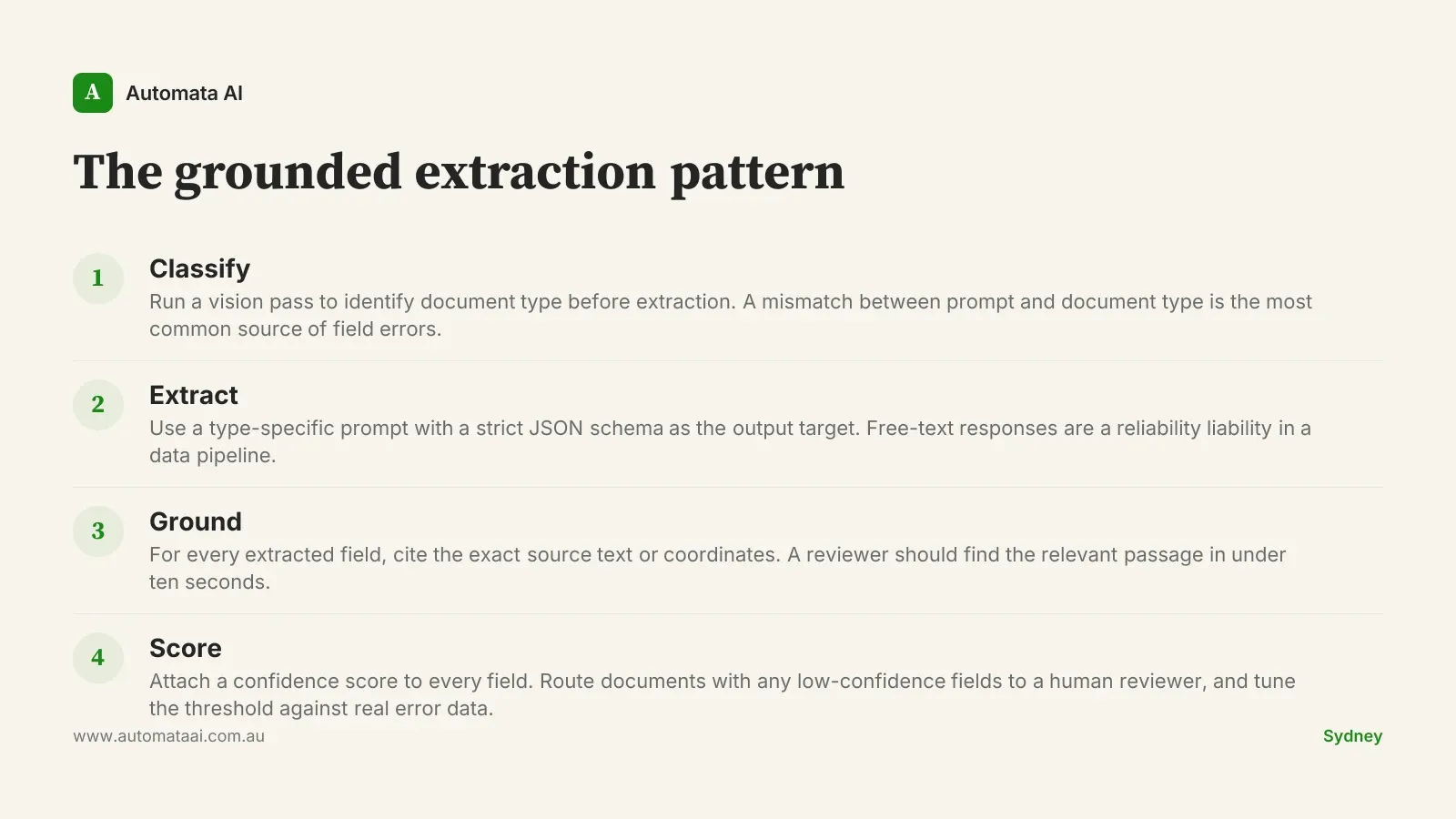
The pattern that works reliably in production is a two-step extraction. The first pass uses Claude's vision capability to identify the document type, pulling metadata about structure and likely field locations. The second pass uses a type-specific prompt with a strict JSON schema as the output target. This separation matters because a bill of lading and a customs declaration look similar on the surface and extract completely differently. Sending both through a single generic extraction prompt is the most common reason early pipelines have 30 to 40 percent error rates.
Grounding is the discipline that separates a production pipeline from a demo. For every extracted field, ask Claude to cite the exact source text or coordinates from the original document. A reviewer checking an uncertain result should be able to locate the relevant passage in under ten seconds. Without grounding, a confidently-extracted wrong number is invisible until it causes a downstream error. That is a worse outcome than routing the document to a human from the start.
Type classification first. Identify the document type before extraction, not during. A mismatch between the type-specific prompt and the actual document structure is the most common source of field extraction failures.
Confidence per field. Extract a confidence score alongside every field value. Route any document where one or more fields fall below your threshold to a human reviewer. Tune the threshold against your real error rates, not a reasonable-sounding default.
Idempotent storage. Store the extraction result against a hash of the input document. If the same document is submitted twice, return the cached result rather than re-extracting. This makes retries safe and prevents duplicated entries in downstream systems.
Structured output only. Constrain Claude to JSON with a schema that matches your downstream system. Free-text summaries are fine for content workflows. They are a reliability liability in a data pipeline.
The economics are not subtle
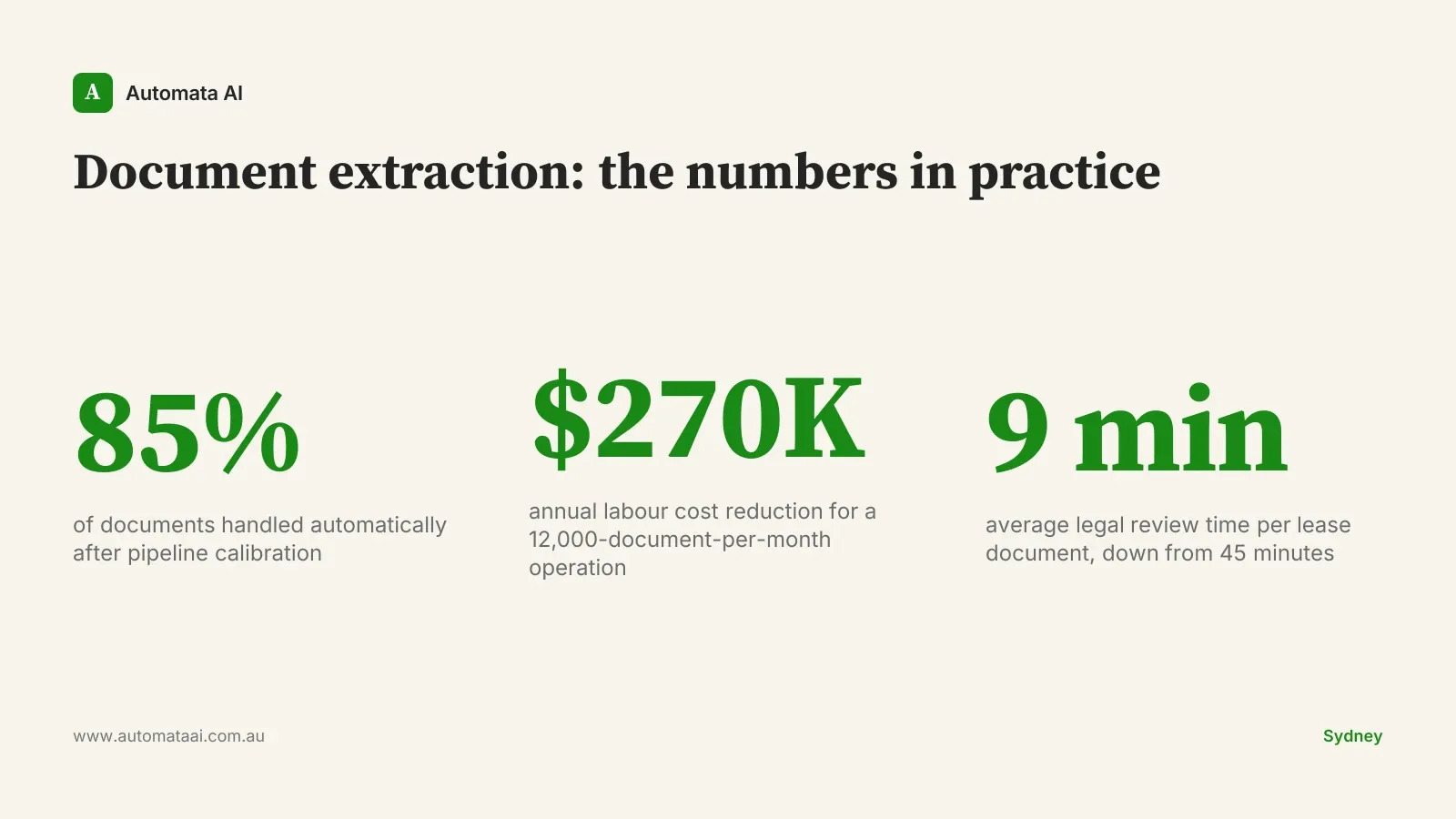
When the Brisbane logistics team automated 85 percent of their bill-of-lading volume, their annual human-review cost dropped from around $360,000 to roughly $90,000. The reviewers who remained were not reviewing easy documents. They were reviewing the 15 percent that had genuine anomalies: damage claims, port authority discrepancies, missing fields. Their error-catch rate went up because their attention was no longer spread across twelve thousand routine documents.
A Sydney commercial property firm extracting lease clauses from 30-year-old scanned PDFs cut their legal review time from around 45 minutes per document to around 9 minutes. The legal team was not replaced. They were redeployed onto dispute analysis and lease negotiation. The pipeline handles clause extraction; the lawyers handle the judgment calls that actually require a lawyer.
If you want to model the AUD payback for your own document volumes and labour rates, our ROI Calculator runs the figures in about three minutes.
The Privacy Act question comes first
Before you build anything, answer one question: where does the document data go? Under the Australian Privacy Principles, organisations handling personal information are responsible for how that data is processed and stored, regardless of whether the processing happens in-house or through a vendor. PDFs containing customer details, medical information, or financial records should be processed through your own Anthropic API account, not through a third-party SaaS wrapper that sits between you and the model. That wrapper is a data processor under the Privacy Act (1988), and its sub-processing arrangements may not align with your obligations.
Logging policy is the second gap most teams miss. The default is to log everything. In a document extraction context, that can mean customer names, financial figures, or medical identifiers persisting in log files well beyond their retention obligation. The logging policy needs to explicitly cover document content, not just API call metadata. Retention should match your legal obligations, not the platform's defaults.
When the pattern does not fit
Not every document processing problem is a Claude vision problem. Three situations where the economics typically do not hold:
Volume under 500 documents per month. Below that threshold, a well-maintained manual process or a simpler rule-based tool is often faster to implement and easier to audit. The automation build cost starts to outweigh the labour saving within the typical payback window.
Fields that require cross-document reasoning. If the correct value in document A depends on context from document B, single-document extraction will not get you there. This is a different architectural problem and needs a different solution.
Scans below 150 DPI. Claude's vision extraction degrades sharply on very low-resolution scans. If your document archive was digitised at 72 DPI for storage purposes, you will need a pre-processing step before extraction is viable at any accuracy rate worth measuring.
The teams that get this wrong tend to start with the technology and work backwards to the use case. The teams that get it right start with a specific document type, count the exact monthly volume, and work out whether the fully loaded cost of the manual process exceeds the build and operating cost of the pipeline. If it does not, do not build it.
What to instrument from the start
Three metrics belong on a shared dashboard from day one. First, field-level extraction accuracy: you want to know which specific fields are systematically wrong, not just which documents failed overall. Second, cost-per-document in tokens: this tells you whether the economics are holding as volume scales and whether the classification step is doing its job by routing documents to the right extraction prompt. Third, exception rate: the proportion of documents routed to human review. A well-calibrated pipeline should see this number drift downward over the first two to three months as confidence thresholds are tuned against real data. If you are not sure whether your document volumes and process complexity justify the build, the AI Readiness Assessment walks through the decision framework for document automation projects.
The exception queue is the most useful output the pipeline produces. It is not a failure pile. It is the list of documents the model correctly identified as uncertain. If that list is shrinking over time, the pipeline is working. If it is static, something in the extraction pattern or the confidence calibration needs attention. Pick one document type, count your monthly volume, and model the payback. The business case usually closes before the conversation does.