Anthropic published their definitive Claude Code best-practices guide in early 2025. The five principles are sound. The problem is they were written for a US tech company with a deep engineering bench, a dedicated DevOps function, and the ability to hire its way through any capacity problem it creates.
Australian mid-market engineering teams are not that. Here is how those principles translate when your senior developer is fully loaded at $230,000, you cannot replace them in under six months, and your codebase sits inside an APRA-regulated environment.
The five principles, translated
1. CLAUDE.md is your starting position
Every Claude Code session begins from your project context file. Without a CLAUDE.md, the model defaults to generic assumptions: wrong file conventions, wrong test patterns, wrong deployment targets. You will spend five minutes every session re-establishing context that should have been written down once and inherited by every developer on the team. With a good one, the first message in every session is substantive, not administrative.
A well-written CLAUDE.md takes two to four hours per repo. At $120 to $160 per hour for a mid-level engineer, that is a $500 investment that pays back every day. Use our AI Readiness Assessment to identify which repos to prioritise first.
For regulated environments, CLAUDE.md is also where you define what Claude Code can and cannot do: which directories it can write to, which commands require human confirmation, which integrations are off limits. Document this before you roll out, not after an auditor asks.
2. Slash commands set team-wide conventions
/test runs your test suite. /review checks against your style guide. /deploy walks through your deployment checklist. Slash commands turn repeatable workflows into single invocations. These are genuinely useful.
The failure mode is every developer building their own. Six weeks in, the team has eight incompatible command sets and nobody knows what the standard is. Set slash-command conventions in week one, put them in CLAUDE.md, and any developer who joins the project inherits them automatically.
3. Plan mode separates thinking from doing
For any non-trivial task, ask Claude Code to produce a plan first. Review it. Then execute. This applies to refactors, new integrations, schema migrations, anything where the full scope is not immediately obvious at the start of a session. The plan step surfaces the invariants you forgot to mention before they become production bugs. It surfaces ambiguity in requirements before you have three hundred lines of code to unwind. And it gives you a natural checkpoint to correct intent before touching the codebase. Skip it and you will get plausible-looking output that quietly violates a constraint nobody specified.
4. Tool permissions shape your risk posture
Claude Code's tool access covers file reads and writes, bash execution, and web requests. Left unscoped in a shared team environment, those are real capabilities running under each developer's identity. The right default: read-only access from the start, expanded permission by permission as each use case is validated.
For teams operating under APRA CPS 230 or similar frameworks, this configuration is documentation you will eventually present to an auditor. Treat it that way from day one, not as an engineering preference but as a control.
5. MCP servers extend reach without breaking the perimeter
When Claude Code needs to reach internal systems such as JIRA, Confluence, or an internal API, MCP is the right integration pattern. It keeps the model inside your security perimeter rather than requiring developers to paste sensitive context into prompts. The typical Australian mid-market MCP configuration covers internal knowledge bases, ticketing systems, and read-only monitoring access. Start there and expand based on validated use cases, not on what is technically possible.
Three things that make Australian teams different
The Anthropic post was written for a well-staffed US engineering organisation. These three factors change how the principles land when applied to Australian mid-market teams.
Smaller teams mean higher stakes per developer
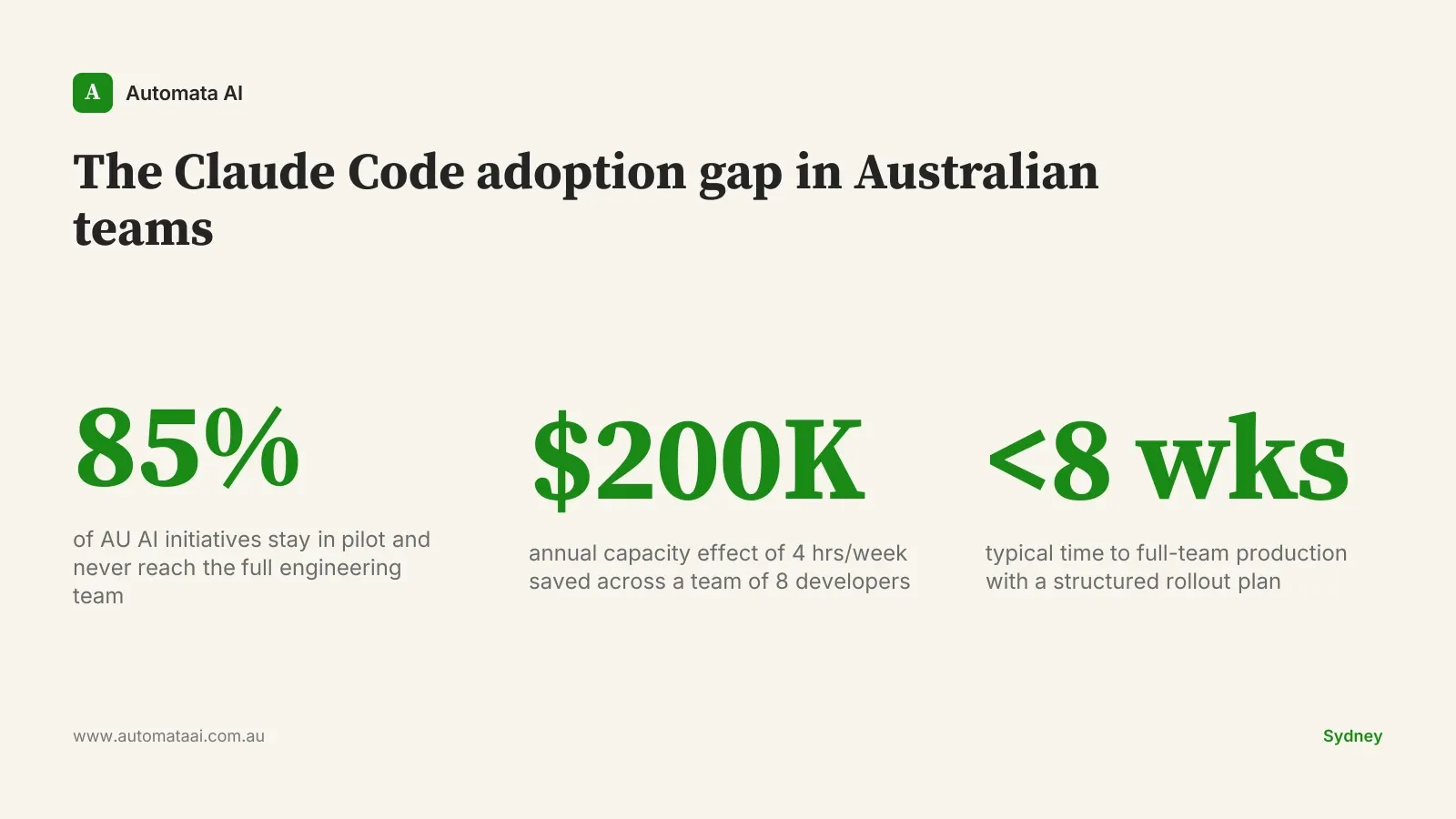
Australian mid-market engineering teams typically run 5 to 20 developers. A Sydney-based senior engineer, fully loaded with superannuation and on-costs, runs $220,000 to $280,000 per year. Saving four hours per week per developer is worth $25,000 in annual capacity at that rate. Across a team of eight, that is $200,000 before you have automated a single business process. You cannot hire a contractor to absorb that gap the way a US company can. Run your team's specific numbers in our ROI Calculator.
Compliance is a design input, not an afterthought
APRA-regulated financial services firms, government agencies, and healthcare organisations face governance requirements the typical US tech company does not. The Privacy Act (1988) and Australian Privacy Principles apply to any system touching personal information, which can include error logs and debug output if they surface customer data. Tool permissioning and CLAUDE.md design are controls in these environments, not preferences. Your internal audit team will want them documented before a Claude Code deployment touches any production system. We cover the regulatory framing in depth in our Financial Services AI guide.
Talent retention shapes the rollout structure
The senior engineer you invest in Claude Code training is harder to replace in Melbourne than in San Francisco. The talent pool is thinner and lead times on hiring are longer. Build the rollout so knowledge is shared, not siloed. Run the pilot with two or three of your strongest engineers working together, not one person figuring it out in isolation and briefing the others after the fact.
When the full-team rollout is the wrong move
Not every team is ready for this. The plan below assumes a baseline: readable codebases, some test coverage, a functioning deployment pipeline. If your codebase is a 15-year-old monolith with no tests and no documentation, Claude Code will increase output. Some of what it increases will be wrong, and the model will not signal uncertainty.
If your team is three developers covering two products with no sprint discipline and unclear ownership, Claude Code is a multiplier on an unstable process. Productivity tooling does not fix process debt. Fix the process first.
No CLAUDE.md in 24 hours of installing. That means nobody has thought about context yet. The session-by-session cost is already accumulating.
Zero slash commands after two weeks. That means the team is exploring, not building conventions. Consistent output requires consistent input.
The 30-day AU Claude Code rollout
This is the rollout structure we apply across our AI Automation Services engagements. It works for teams of 5 to 20 developers across regulated and unregulated environments.
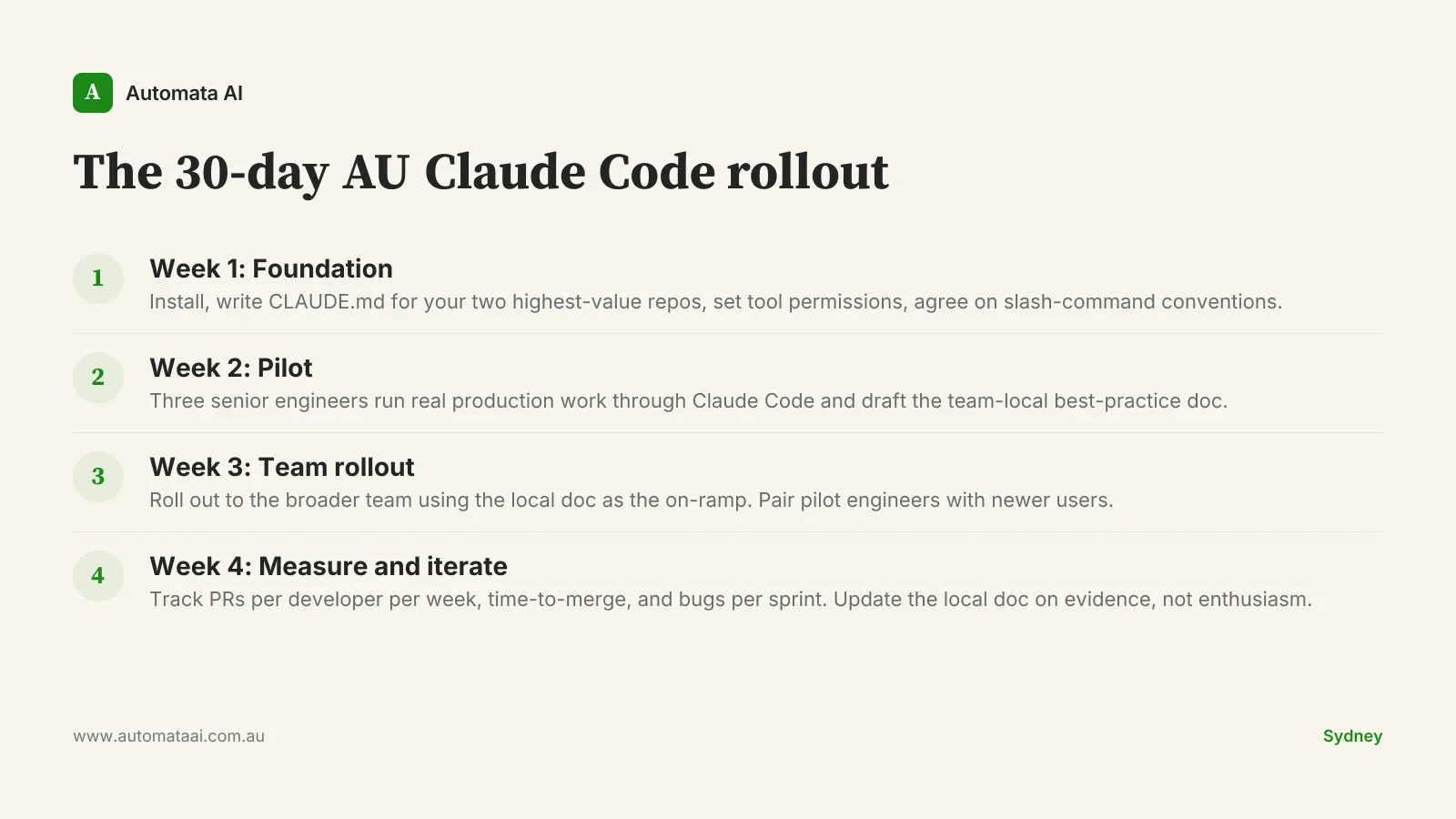
Week 1. Install Claude Code. Write CLAUDE.md for your two highest-value repos. Set tool permission defaults. Agree slash-command conventions and document them in the same file.
Week 2. Three senior engineers run real production work through Claude Code. They document what works and what does not in a team-local best-practice file.
Week 3. Roll out to the full team using the local doc as the on-ramp. Pair pilot engineers with developers who are newer to the tool.
Week 4. Measure PRs per developer per week, time-to-merge, and bugs per sprint. Iterate on the local doc. Declare success only on evidence.
Pick your two highest-value repos. Write the CLAUDE.md. Set the permissions. The engineering capacity you recover in the first 30 days will tell you whether to push harder or pull back. Almost always, teams push harder.