Your Claude API bill arrived last month. The number surprised you. Not because the pricing is wrong — because half those tokens were priced as fresh when they didn't need to be.
Most Australian engineering teams running Claude at volume send the same system prompt, the same tool definitions, and the same policy documentation on every single request. Claude prompt caching eliminates that waste. For a mid-market app at five million monthly requests, the gap between thoughtful caching and none is $35,000 to $65,000 AUD per month. Over a year, that is the cost of a senior engineer.
What Claude prompt caching actually does
Claude's prompt caching stores a prefix of your prompt across requests. The first call computes the prefix at the standard rate. Every subsequent call within the cache window pays a fraction of that rate for the cached portion and responds faster.
Your prompt has a stable part and a dynamic part. The stable part covers things that don't change between requests: the system prompt, tool definitions, policy documents, and few-shot examples that shape output format. The dynamic part is everything specific to the current request: the user's message, session state, per-request context. Caching only applies to the stable part, and that part must appear first in the prompt structure.
What to cache
System prompts. If you're sending the same 2,000-word instruction block on every request, that block should be cached. Always.
Product catalogues and policy documents. A customer support agent holding a 10,000-token product catalogue doesn't need to re-process it per message.
Tool definitions. When your tool list is stable across a session, cache it. Dynamic tool sets per user are the exception.
Few-shot examples. Style examples that shape output format rarely change. Cache them.
What to leave out of the cache
The user's message. It's always unique.
Per-request session context. The current cart, the active support ticket, the logged-in user's profile. This changes.
Anything that turns over faster than the cache window. If content changes more than once every five minutes, don't cache it.
Choosing the right cache window
Claude offers two cache windows: five minutes and one hour. The five-minute window fits chat-style applications where users are in active, burst sessions. A user asking five questions over four minutes benefits from a warm cache. The overhead is small; the hit rate during an active session is high.
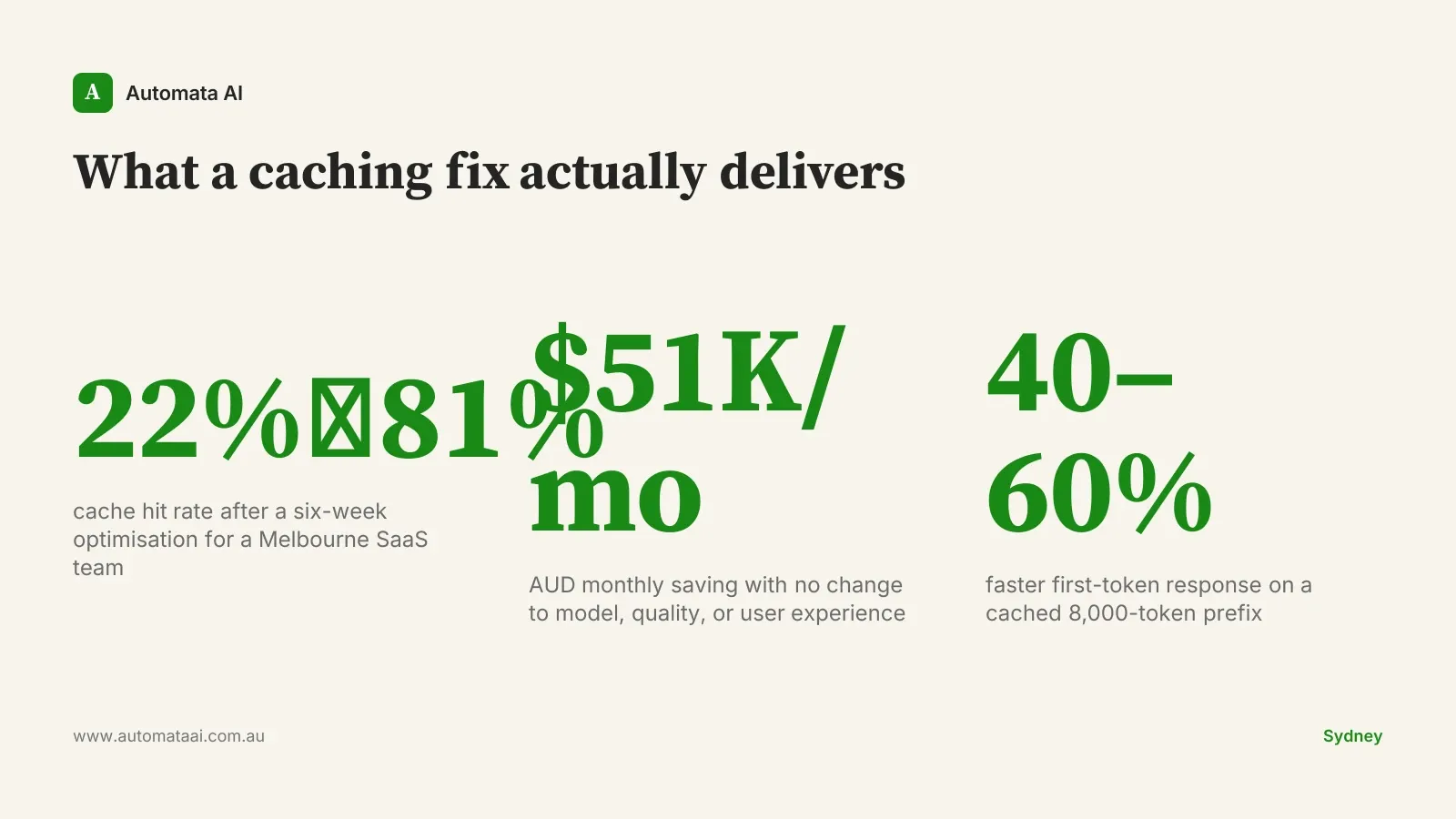
The one-hour window suits batch processing, agentic workflows, and high-concurrency customer support. If a single system prompt serves 200 concurrent conversations in the same hour, the one-hour cache pays back across all of them. A Melbourne SaaS team we worked with moved their customer support agent's system prompt from no-cache to the one-hour window. Their monthly Claude spend dropped from $85,000 AUD to $34,000 AUD. Same model, same quality, same user experience. Cache configuration was the only change.
You can model the AUD saving for your own traffic patterns in our ROI Calculator. The inputs are simple: monthly request volume, average prompt size, and cache hit rate target.
When prompt caching won't help
Not every app benefits equally. If your average prompt is under 1,024 tokens, the caching overhead isn't worth it. The minimum cacheable prefix for Claude is 1,024 tokens. Below that threshold, you pay the write cost with no payback on short sessions.
If your system prompt changes per user, caching is harder to apply cleanly. Personalised instructions or per-tenant configuration embedded in the prompt prevent clean prefix sharing. It's still possible, but you need to restructure so the stable part comes first, before any dynamic content. That sometimes requires rethinking how the prompt is assembled, not just toggling a flag.
If your traffic pattern is genuinely low-volume and bursty, a process that runs twice a day or a batch that fires at 2am will find the cache expired between runs regardless of which window you choose. Don't optimise for caching here. Optimise the prompt size instead.
The cache-layer audit: measuring what matters
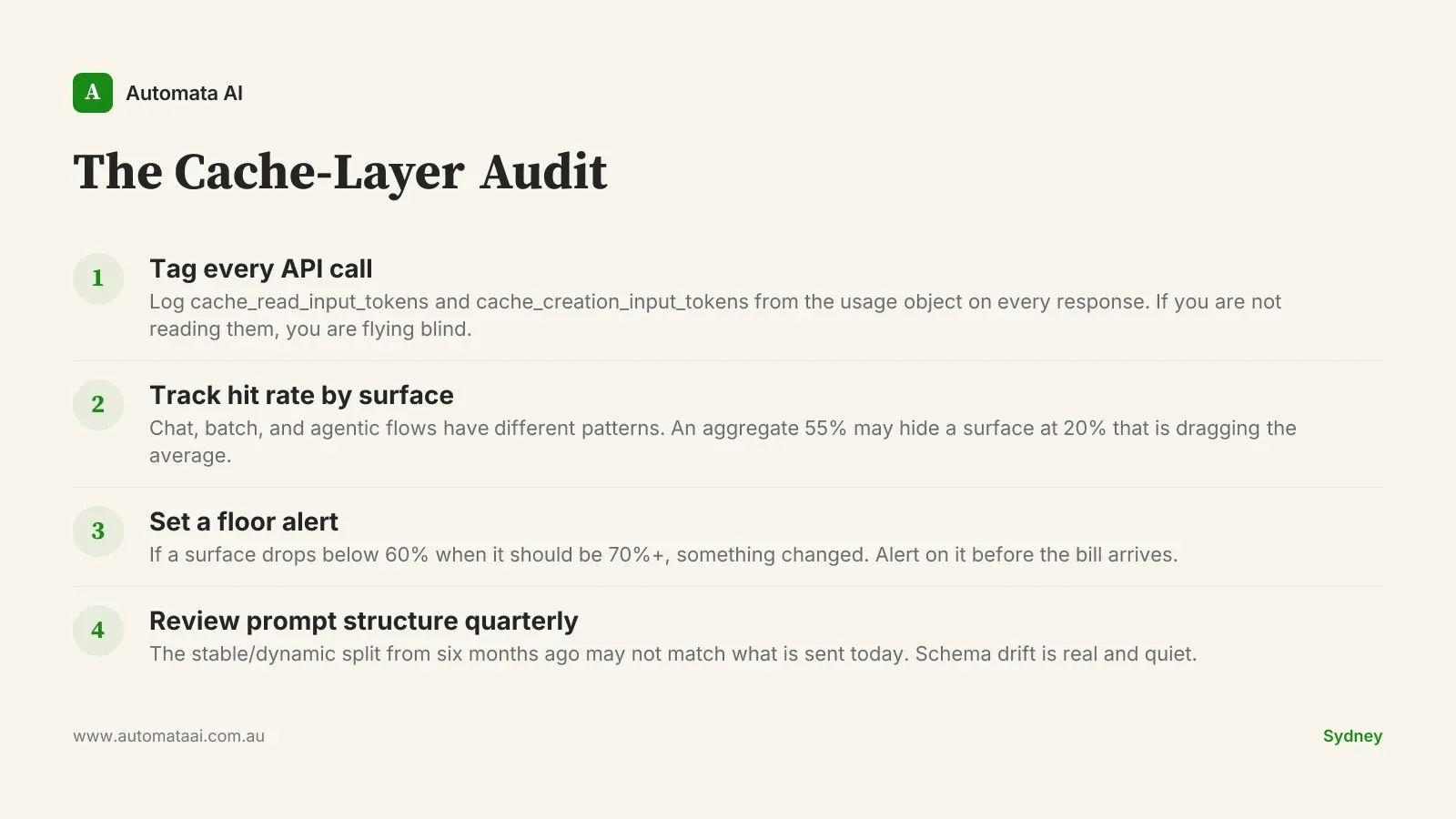
Most teams that under-perform on caching don't have a configuration problem. They have a measurement problem. Without visibility into hit rates, the cache is invisible. Invisible infrastructure drifts. Instrumenting Claude apps is one of the first things we do in our AI Automation Services engagements, before any optimisation work begins. The framework we use is the Cache-Layer Audit, which covers four practices.
Tag every API call. Anthropic's usage object returns cache_read_input_tokens and cache_creation_input_tokens on every response. If you're not reading them, you're flying blind.
Track hit rate by surface. Chat features, batch jobs, and agentic flows have different traffic patterns. An aggregate hit rate of 55% might be hiding a chat surface at 80% and a batch job at 20%.
Set a floor alert. If a surface that should be hitting 70%+ drops below 60%, something changed: prompt structure, traffic pattern, or deployment config. Alert on it before the bill arrives.
Review prompt structure quarterly. The stable/dynamic split you designed six months ago may not match what's actually being sent today. Schema drift is real and quiet.
The latency dividend
Caching is usually framed as a cost story. It is also a latency story, and for real-time chat applications, the latency story matters more. A cached prefix of 8,000 tokens responds 40 to 60 per cent faster than an uncached one of the same size. For a customer-facing chat interface, that is the difference between an app that feels slow and one that feels instant. Australian users apply the same latency expectations to locally-hosted apps that they apply to US incumbents. There is no grace period.
The teams that optimise caching purely for cost and ignore the latency dividend are leaving half the value on the table. Cache hit rate is not a billing metric. It is a product quality metric.
Audit your cache hit rate this week. If it is under 60% on your highest-volume surfaces, the fix is usually prompt restructuring, not re-architecture. If you want help mapping your surfaces and running the numbers, contact our team for a cost and caching review.