A Melbourne marketing team spent three days trialling Gemini's new photo personalisation feature before their legal counsel asked a simple question: which personal photos did the model just train on, and where did that data go? Nobody had an answer. The pilot stopped there.
That gap is not an edge case. It is the exact problem that separates individual-creator tools from enterprise-grade image workflows. Google's feature is genuinely useful. For Australian teams running generation at scale, particularly in financial services or any regulated industry, the transparency question is material from day one.
Australian enterprises have spent the last two years building internal confidence in AI tools. Gemini's latest feature will land on the radar of every marketing and brand team. The instinct to trial it is reasonable. The failure mode is adopting it without mapping the data flows first.
What Gemini's personalisation feature actually does
Google's Gemini now analyses a user's Google Photos library to infer visual preferences, then applies those inferences during image generation. Describe your intent in plain language and Gemini attempts to match it to your personal aesthetic history. The feature launched for US AI Pro and Ultra subscribers and is expected to expand to other markets through 2026. For Australian enterprises, the timing lands just as image generation has become one of the higher-volume AI use cases for marketing and communications teams.
The mechanism is opaque. Gemini does not disclose which photos it weighted, how it balanced personal style against brand guidelines, or whether generated images are tied to identifiable photo metadata. For an individual making social content, that is probably acceptable. For an Australian enterprise generating marketing materials at volume, it is a compliance question that needs an answer before the workflow is approved, not after.
The Australian Privacy Act exposure most teams haven't mapped
Under the Australian Privacy Act 1988, the Australian Privacy Principles require organisations to be transparent about how personal information is collected and used. APP 1 covers this explicitly. If an enterprise's image generation workflow feeds employee or client photos into a cloud model with no documented audit trail, that transparency obligation is hard to satisfy. The Australian Information Commissioner treats photos as personal information where an individual is reasonably identifiable, which covers most workplace and client imagery.
ASIC-regulated firms face an additional layer. A wealth management firm generating personalised client communication materials cannot easily demonstrate to a regulator that no client data influenced AI outputs if the generation model is a black box. The audit trail has to exist before the regulator asks for it, not after. Teams already navigating AI automation for financial services know this pattern well.
The Brand-to-Output Pipeline
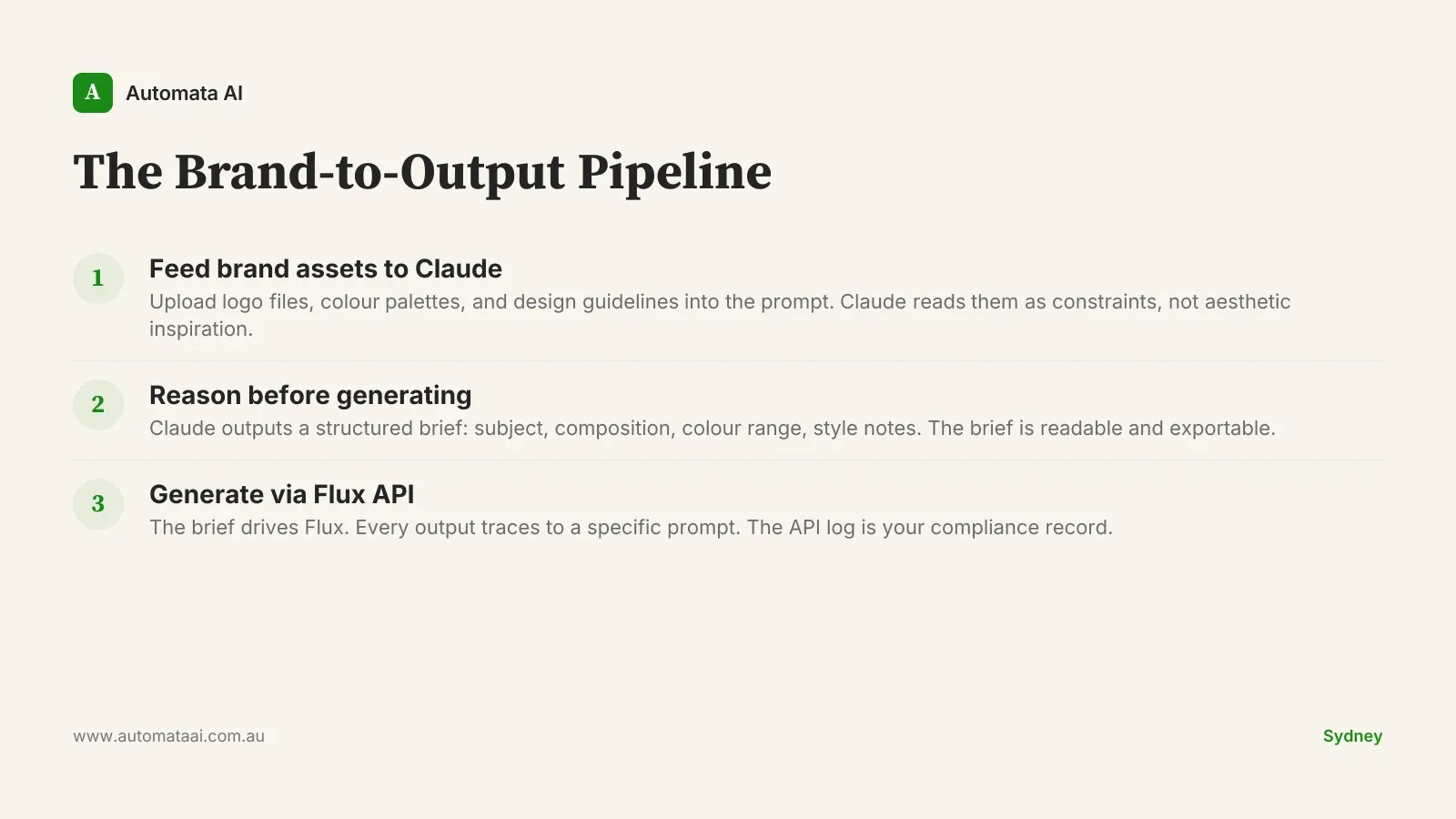
There is a simpler, more transparent approach. Rather than inferring brand style from scattered personal photos, Australian teams can build a deterministic pipeline using Claude for visual reasoning and Flux for generation. The core distinction is explicit versus implicit: Claude reasons from brand assets you hand it; Gemini infers from images that may include personal data you did not intend to include. Start with an AI Readiness Assessment to map which image workflows have the volume and compliance requirements to justify a custom pipeline.
Feed brand assets directly. Upload logo files, colour palettes, and design system documentation into the generation prompt. Claude reads them as constraints, not as aesthetic inspiration.
Reason before generating. Claude analyses the brand constraints and outputs a structured image brief: subject, composition, colour range, and style notes. The brief is readable and exportable.
Generate via Flux API. The brief drives Flux. Every output traces back to a specific prompt and a specific brief. The API log is your compliance record.
Every image has a documented lineage. The reasoning step is visible, exportable, and version-controlled if you store the briefs alongside your other brand documentation. If a compliance team needs to demonstrate that no personal photos were used in a campaign asset, the answer is a log entry, not a vendor support ticket. That is the difference between a workflow that can scale and one that cannot.
When Gemini is actually the right tool
This is not a case for switching every image workflow tomorrow. Gemini's personalisation is genuinely useful in specific scenarios, and overstating the compliance risk where it does not apply would be bad advice. The question is not which tool is better in the abstract. It is which tool fits your specific workflow, volume, and compliance requirements.
The personalisation feature is most compelling for personal creative work where the aesthetic feedback loop is tight and regulatory exposure is low. Gemini reads your past photos and applies that visual memory automatically, which reduces iteration time for individual creators. That is a real product advantage.
Individual creators in non-regulated industries. A freelance designer with no client data in the loop has limited Privacy Act exposure and a real usability benefit.
Low-volume personal branding. Teams generating fewer than 100 images a month will not see meaningful cost differences. The Gemini interface requires no API configuration.
Google Workspace-embedded workflows. If your team is already deep in Google Workspace and image generation is incidental rather than core, the integration reduces friction in ways that matter for adoption.
The honest version of the cost-benefit: if your image volume is under 100 per month and you are not in financial services, insurance, or healthcare, there is no compelling reason to build a custom API pipeline. The compliance and cost argument only sharpens above that threshold.
What this costs at Australian enterprise scale
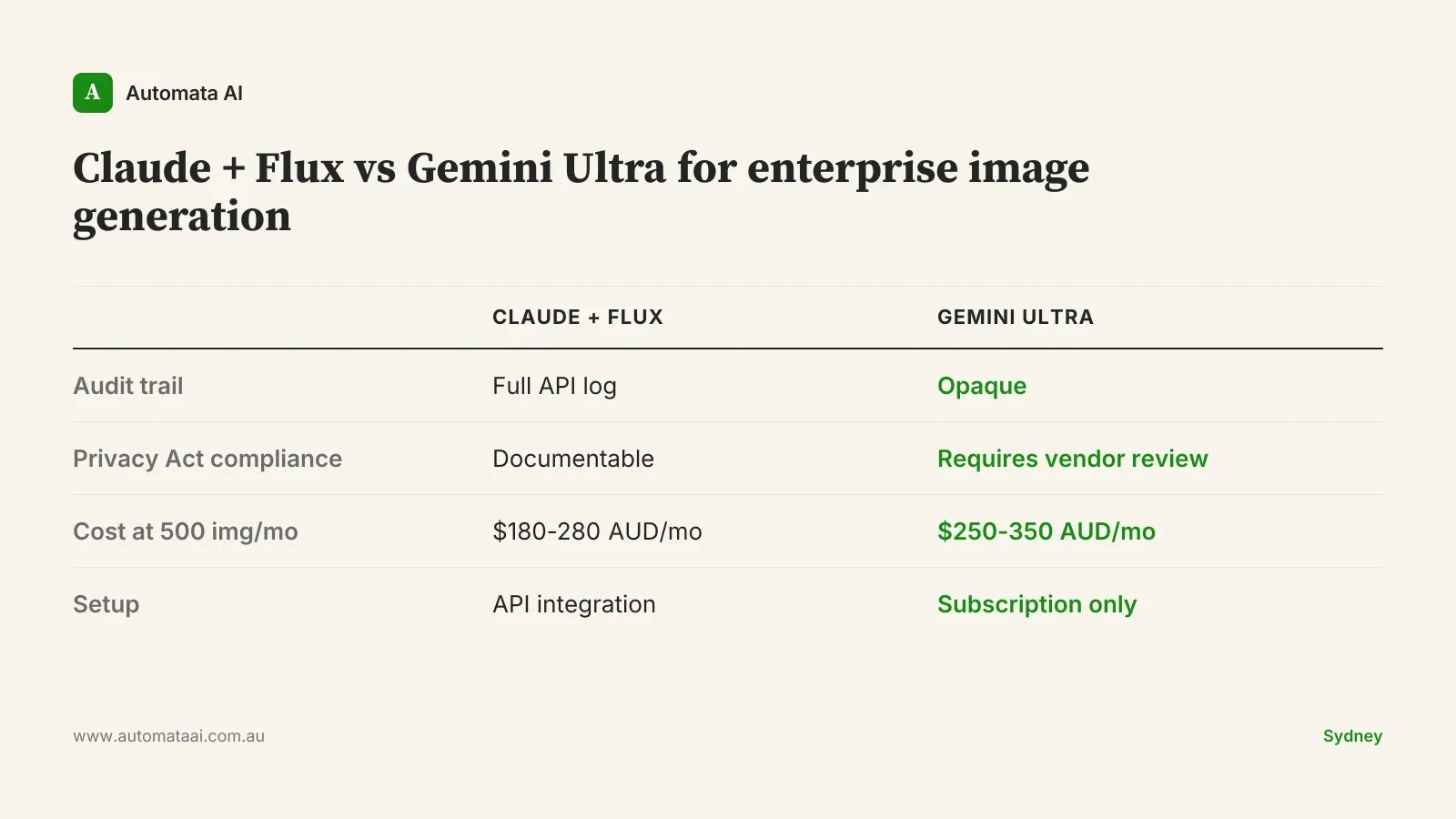
For a team generating 500 images a month, a Claude plus Flux pipeline runs roughly $180 to $280 AUD per month in API costs, depending on resolution and brief complexity. A comparable Gemini Ultra subscription for a five-person team sits at $250 to $350 AUD per month at current pricing, before enterprise seat adjustments. At 2,000 images a month, the API-based pipeline is 40 to 60 percent cheaper. At 3,000 images a month, the gap reaches $800 to $1,200 AUD per month, and the API cost does not reprice when your team headcount changes.
Factor in compliance overhead and the savings widen further. A single APP-related incident response — legal review, regulator correspondence, remediation documentation — costs far more than twelve months of API spend. Run the full numbers through our ROI Calculator to model your specific workflow against both tools.
Pick your highest-volume image workflow. Document where the inputs come from and what happens to them. If the answer requires a phone call to a vendor's compliance team, that is your risk register item for next quarter. The pipeline question is not about AI philosophy. It is about which tool you can actually defend.