You've seen the Gemini 3 release notes. Google shipped it as the new default in the Gemini app, and the demos are strong. If you're an Australian consultant, analyst, or knowledge worker who has been running Claude as your daily driver, the question is a real one now: switch, or stay?
This is not a benchmarks post. Benchmarks are useful for researchers and close to useless for practitioners. The only question that matters is whether Gemini 3 handles the specific things you do all day better than Claude does. That answer varies sharply by workload type.
Where Gemini 3 is genuinely ahead
Three areas where the upgrade is material:
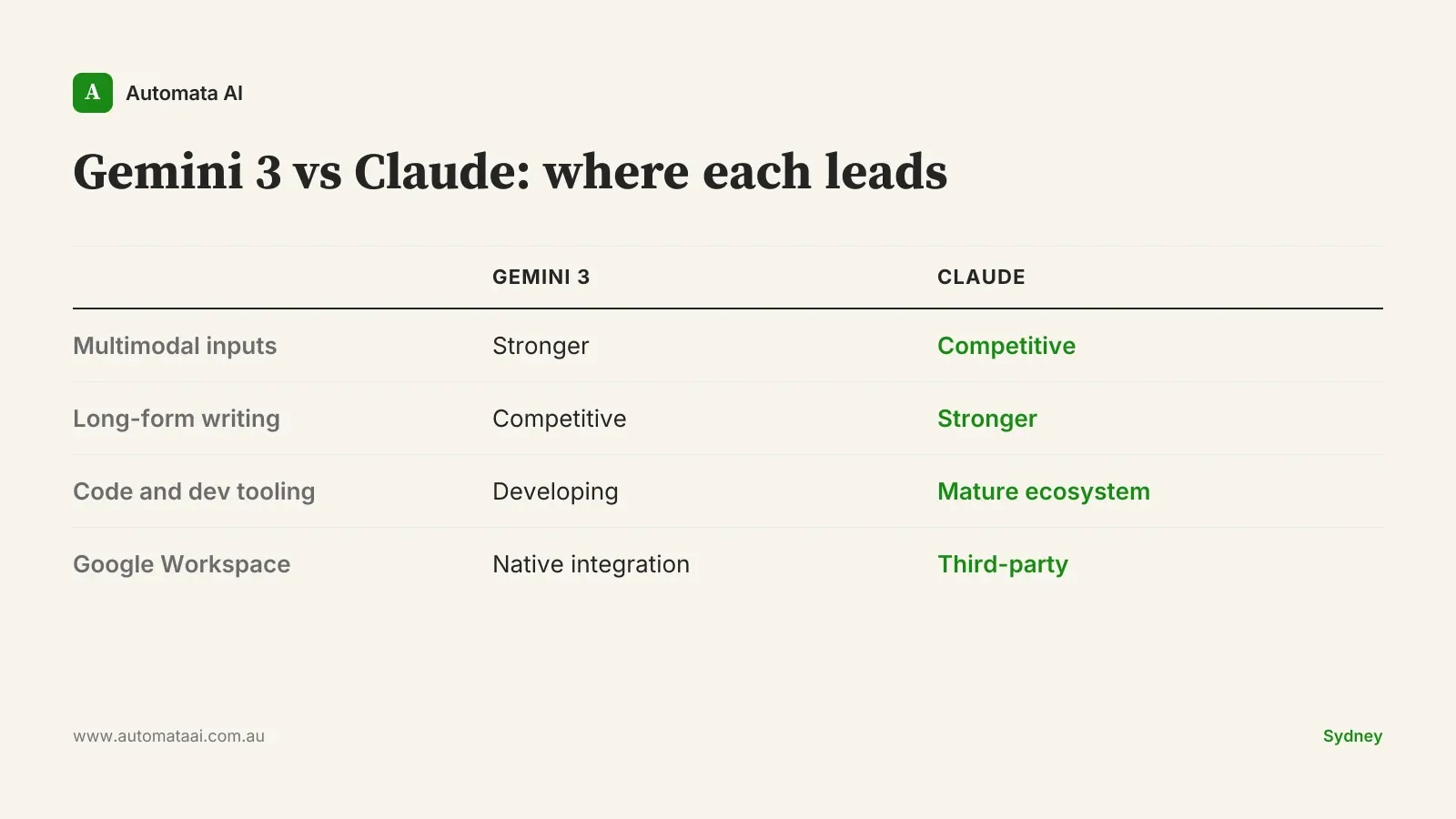
Multimodal coherence. Gemini 3 handles image, text, and audio inputs more reliably in mixed conversations. If your day includes processing screenshots from client systems, transcribing recorded meetings alongside text, or extracting data from visual PDFs, this is a real step up over Gemini 2.5.
Google Workspace integration. The Gemini app's connection to Gmail, Calendar, Docs, Sheets, and Drive is now useful in daily work, not just in demos. For Australian teams already standardised on Google Workspace, this is the strongest argument for a trial.
Long-context retention. Gemini 3 holds up better across extended conversations than Gemini 2.5 did. It hasn't closed the gap with Claude entirely, but it's materially closer than it was.
Where Claude still leads for Australian power users
The category where Claude holds its advantage most clearly is long-form structured work: business writing, analytical reports, board papers, policy documents. The output quality on a 3,000-word market analysis or a structured client brief is still stronger on Claude — not marginally, but visibly. That's the first thing to test before switching.
The other two areas are code and agent workflows. Claude Code is a mature product. The combination of model quality, IDE integrations across JetBrains and VS Code, and the MCP server ecosystem creates a surface that Gemini's code tooling hasn't matched. For any Australian developer using AI for daily coding work, this is not a close call.
Long-form and analytical writing. Board reports, policy documents, analytical briefs, structured client output. Claude's quality on extended writing tasks is still the reference point.
Code and Claude Code. Model quality and product surface together: IDE integrations, Claude Skills, MCP. More mature than the alternatives.
Agent and automation workflows. Custom agents, multi-step automations, tool-use chains. The Claude agent ecosystem has a head start that matters if you've built workflow investment on top of it.
The workload-first switch test
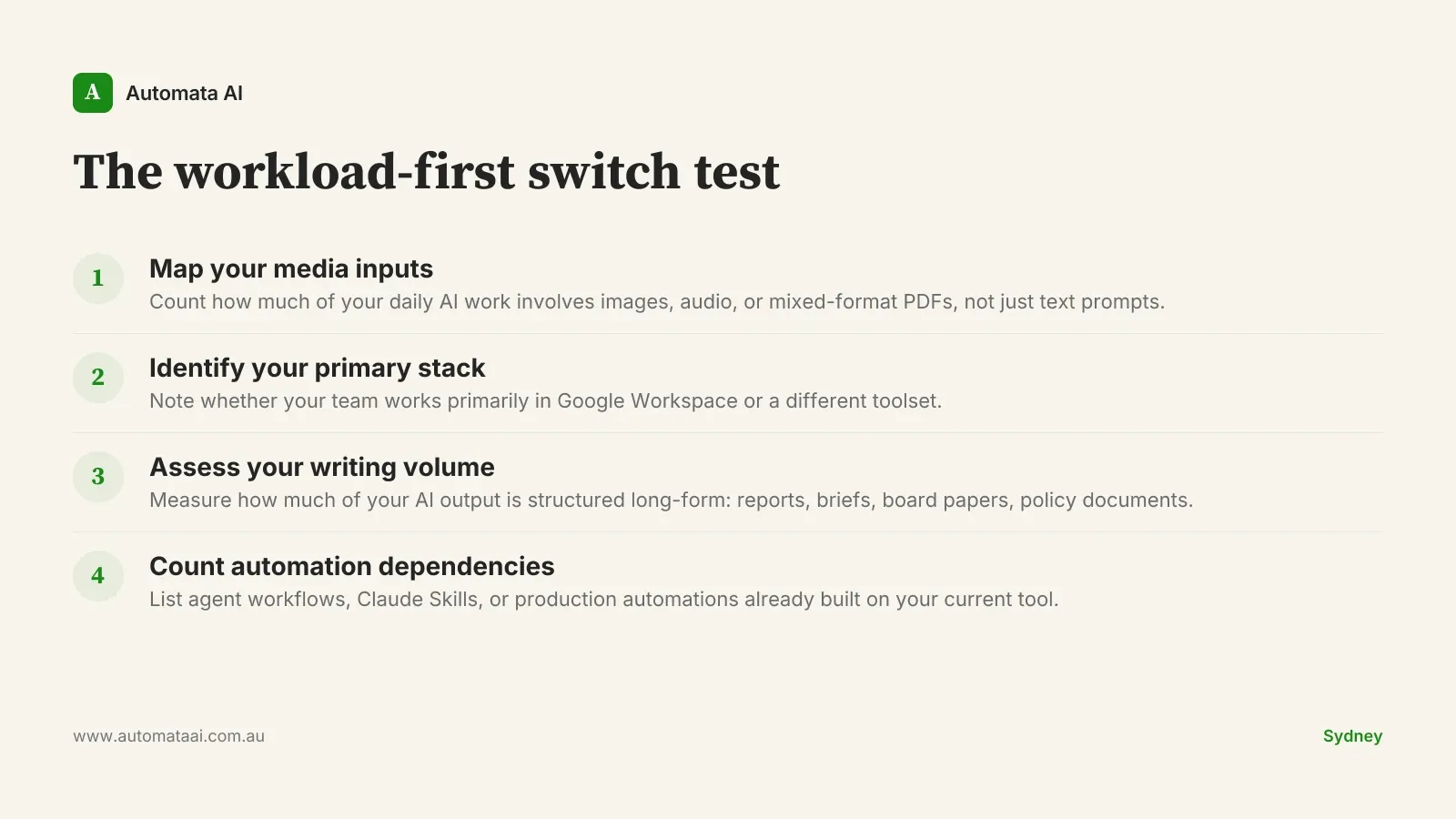
The mistake most teams make when evaluating a new AI app is testing general capability rather than their specific daily workloads. Here is a more useful frame. I call it the workload-first switch test: four questions that take ten minutes and tell you more than any benchmark score.
What percentage of your daily AI interactions involve mixed-media inputs (images, audio, PDFs with embedded charts)?
Do you primarily work inside Google Workspace, or a different stack?
Is long-form structured writing a major part of your daily output?
Are you building or running agent workflows, automations, or production code?
If you answered yes to the first two and no to the last two, Gemini 3 is worth a genuine two-week trial. If the reverse is true and your day is dominated by writing, code, or agent workflows, stay with Claude for now. The productivity cost of switching tools mid-flow is real, and there is no point switching to a tool that handles your dominant workload less well.
One thing worth saying plainly: if you're reading this hoping for permission to switch because Gemini 3 is newer, that's not a workload argument. Novelty is not a productivity driver. The better question is whether the last six months with your current tool have been producing the outputs your work actually requires.
When you should not run a side-by-side trial
Side-by-side trials are valuable when you have a genuine decision to make. They're a distraction when:
Your team is mid-rollout. If you're three months into a Claude deployment and your people are just becoming productive, introducing a second tool creates retraining cost and regression risk. Wait for the next major release cycle before reassessing.
Your workflows are writing-dominant. If 70% or more of your AI usage is document production, analysis, or structured business writing, you would be trialling a tool that handles your core workload worse.
You have built workflow investment in Claude. Custom agents, Claude Skills, automation chains. The switching cost is not just a tab change. It is rebuilding.
For most Australian knowledge workers, running two AI apps in parallel leads to neither being used well. You develop shallow habits on both tools instead of deep proficiency on one. Pick the tool that fits your dominant workload and invest in actually learning how to use it.
What this means for Australian enterprise rollouts
For Australian enterprises currently in active Claude deployment (the 100-to-500-seat rollouts we're supporting across professional services firms in Sydney and Melbourne), Gemini 3 is not a reason to pause. The capability gap on the workloads enterprise users actually run daily is still in Claude's favour. That includes document-heavy compliance work, client report production, and multi-step analytical reasoning.
The cost reality matters here. A 200-person Australian enterprise running both Claude and Gemini as dual platforms hits annual licensing in the $250,000 to $600,000 range. Claude-only sits at $180,000 to $400,000 depending on tier and volume. Running both has a legitimate case if you have identifiable cohorts with genuinely different workload profiles: design teams, content reviewers, or departments heavily embedded in Google Workspace. For organisations in regulated sectors, dual platforms also mean dual data residency and AI governance obligations under the Australian Privacy Principles. Running both as a hedge is expensive overhead that most mid-market Australian businesses are not resourced to manage.
If you're advising a mid-market Australian company on which platform to standardise on, run the workload-first switch test at the team level, not just at the individual level. The answer may differ by department. Our AI Readiness Assessment is built to map workload patterns before a platform decision is made.
Enterprises already rolling out Claude through our AI Automation Services have governance, integration, and training infrastructure in place. Adding a second platform disrupts that architecture. Make a deliberate call before expanding the footprint.
The two-week trial, done properly
For teams where the workload-first switch test genuinely suggests Gemini 3 is worth trialling:
Pick two workflows that represent your dominant daily work type, not edge cases or demos.
Run identical inputs through Gemini 3 and Claude for two weeks. Log output quality, not just preference.
At the end of the trial, count which tool produced more work you shipped without editing.
Reassess at the next major model release from either side. The answer does change.
The Australian enterprise AI landscape is genuinely competitive now. The right daily driver is the one that handles your actual work most reliably. Not the newest model. Not the one with the best demo. If you want to pressure-test the workload-first analysis against your team's specific workflows, contact Automata AI.