Your Sydney operations team has Google Gemini and Claude both open in adjacent tabs. Thursday deadline: a board-ready slide deck and a working budget model. Both tools can produce a file. Capability is not the issue.
The question is which surface fits how your team actually works. That distinction matters more than most comparison articles admit, and the answer depends almost entirely on your team's most common output types, not on which platform has the longer feature list.
What each surface actually does
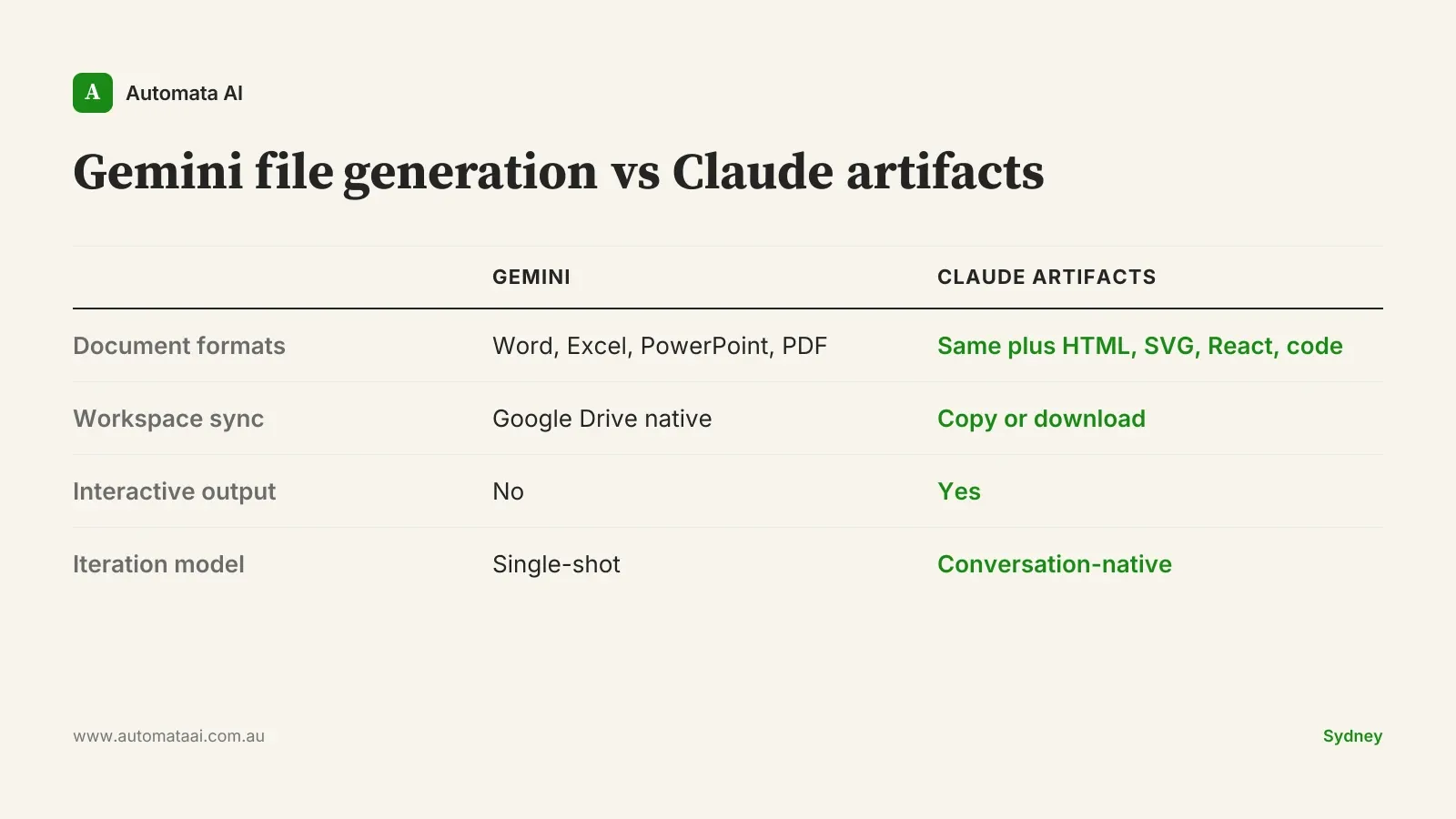
Gemini file generation produces Word documents, Excel spreadsheets, PowerPoint presentations, and PDFs directly from chat. It integrates with Google Workspace and syncs generated files to Drive immediately. For an Australian business running Google Workspace natively, the output lands where your team expects it, in the formats your clients and internal stakeholders already open without a second thought.
Claude artifacts cover the same standard document types and extend further: HTML, SVG, React components, interactive charts, and custom calculators. The design philosophy is different. Artifacts are built to be iterated on in conversation, not generated once and exported. Claude treats the artifact as a working surface, not a finished product.
Where Gemini file generation earns its place
Google Workspace is your operating system. If your team's daily work lives in Drive, Docs, and Sheets, Gemini's file output lands exactly where your people expect it. No export, no format negotiation, no extra steps.
Office format fidelity matters. Gemini's Word and Excel output is clean, with minimal cleanup required. For documents going straight to clients or board packs, that matters more than format flexibility.
Collaborative editing follows immediately. Generated files appear in Drive and the whole team can edit from a shared link before the meeting is over.
This is a genuine strength for standard document workflows. If your team produces a high volume of documents for internal circulation and is already Google Workspace native, Gemini's friction advantage is real. It reduces the steps between generation and distribution to near zero, which matters when you're producing dozens of outputs a week.
The caveat is specificity. Gemini earns this advantage primarily for teams whose workflow ends at the document. Generate, review, share, done. Once the workflow includes iteration, interactivity, or format switching, the advantage narrows quickly.
Where Claude artifacts are the better choice
The first draft is never the last draft. Artifacts are designed for multi-round refinement. You can paste a messy internal brief, ask Claude to restructure it, push back on the structure, adjust the tone, and work toward a final version without losing context. Gemini's file output is better at the single-shot.
You need interactive output. Financial models with adjustable assumptions, dashboards built from pasted data, charts that respond to inputs. This is Claude artifact territory. Gemini file generation produces static documents.
Your team works across environments. Australian mid-market businesses often run Microsoft 365 and Google tools side by side, or send files to external stakeholders who receive documents in any format. Artifacts can be markdown, HTML, code, or standard office formats.
The interactive and iterative advantages compound over time. A financial model built as a Claude artifact can be refined and recalculated in the same conversation. A Word file exported from Gemini requires reopening, re-importing, or re-generating from a new prompt. For workflows with more than two rounds of revision, the artifact model is meaningfully faster even when the initial generation speed is similar.
How to match the tool to the work
The clearest approach is to sort your team's regular output types into three buckets and see where the volume sits.
Documents and slides for circulation. Either platform handles this. Google Workspace native teams find Gemini lower-friction; Microsoft 365 shops find Claude equally capable.
Analysis outputs: dashboards, models, calculators. Claude artifacts. This is not a close call.
Iterative, multi-round document work. Claude artifacts. The refinement loop matters when a document needs ten rounds of revision, not one.
Most Australian productivity teams have all three workload types. Most only run head-to-head comparisons on the first, which is the category where the choice matters least. The comparisons that matter most, interactive analysis and iterative refinement, tend to get skipped because they're harder to set up in a quick demo.
When the tool isn't the problem
Here's the honest part. Both Gemini file generation and Claude artifacts produce first-draft-quality output. If the bottleneck in your team's workflow is the human review step, the point where someone reads the AI output and decides what to keep, refine, and restructure, the tool choice is not your constraint. The constraint is the process around the tool. Teams that skip that review step get poor results regardless of which platform they're running.
A team with a clear review standard will get good output from either platform. A team without one will get mediocre output from both.
There are also workflows where you should be cautious with both tools. If the document type involves regulated advice, complex legal drafting, or obligations under the Australian Privacy Principles, an AI-generated first draft needs professional review before it reaches a client or regulatory body. The review requirement doesn't change based on which platform generated the draft, and no productivity gain justifies skipping it.
The cost question for Australian businesses
For a team of 50 to 200 productivity users, the licensing gap between Google Workspace with Gemini Advanced and Anthropic's Claude for Teams is typically in the $30,000 to $90,000 per year range. That figure varies by tier, negotiated pricing, whether you're adding AI seats to an existing contract, and whether you're rolling out to all users or a targeted subset. That's real money, but it's not where most Australian businesses get the calculation wrong.
The more material figure is the opportunity cost of running the wrong surface for your team's actual work. If the bulk of your AI output goes into interactive analysis and iterative document refinement, and you're running a platform optimised for single-shot document generation, you're paying full price for half the capability. Platform fit matters more than platform cost.
Pick one week. Have your team log every AI-assisted output by type: documents for internal circulation, analysis and interactive outputs, iterative drafts requiring three or more rounds of revision. Count them. The distribution tells you more about which platform to standardise on than any head-to-head demo, and it takes thirty minutes to set up.